
Your account security is important to us. This guide will walk you through how to manage your login credentials, update account details, and enable extra layers of protection with multi-factor authentication (MFA).
Guided Walkthrough
Accessing Login Settings
- Navigate to Account > My Login Settings to update your personal login information.
Change Your Password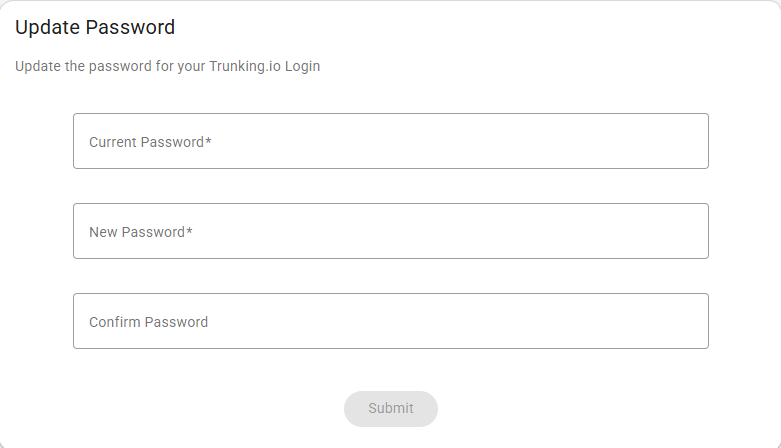
- Enter your current password.
- Create a new password (minimum 12 characters).
- Confirm the new password.
- Click Submit.
Your new password will take effect immediately.
Update Your Email Address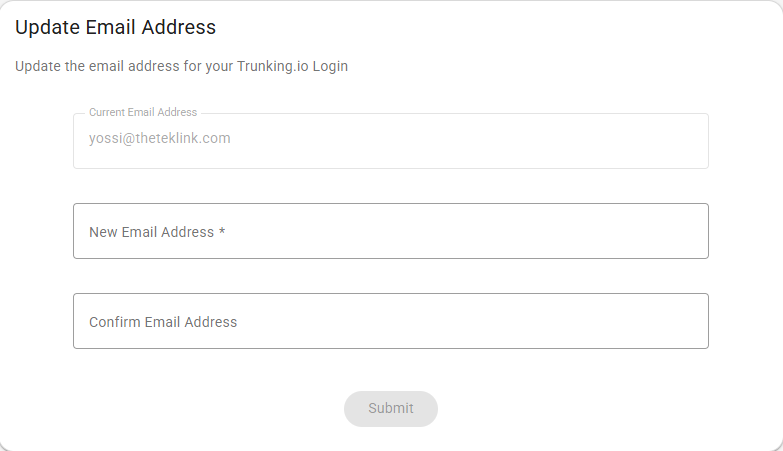
Your email is used for login and important notifications.
- Enter your current email address (displayed in gray).
- Enter your new email address.
- Confirm the new email address.
- Click Submit.
- Check your new email for a verification link.
Once verified, you will use the new email address for all login purposes.
Enable Multi-Factor Authentication (MFA)
MFA provides an additional layer of protection by requiring a one-time code sent to your email to verify your credentials.
To enable MFA:
1. Scroll to the Multi-Factor Authentication section.
2. Toggle Email MFA to on.
3. Enter the verification code sent to your email.
4. MFA is now active for your account and will be required for log in purposes.
To disable MFA: - Toggle Email MFA to off (not recommended).
Managing Other Users
Allows you to manage authorized users and their access within the Trunking.io portal: - Go to Account > Manage Logins.
Note: My Login Settings only apply to your personal login.
Security Best Practices
- Use a unique password that is not being used anywhere else.
- Enable MFA for stronger protection.
- Update your password every 90 days.
- Never share your login credentials.
Locked Out?
If you cannot access your account:
1. Click Forgot Password on the login page.
2. Follow the reset instructions sent to your email.
3. Still stuck? Contact support@trunking.io.
What’s Next
- Add team members to your account.
- Set up API access for automation.
- Configure your company settings.
Getting Help
- Login Issues: support@trunking.io
- Security Questions: security@trunking.io
- Phone: 844-468-7865
Comments
0 comments
Please sign in to leave a comment.